Backups + data integrity

Data integrity
Ensuring data integrity in a backup is essential to guarantee that the stored information remains accurate, complete, and uncorrupted. Without verification methods like checksums, backups may contain unnoticed errors, making them unreliable for recovery.
Simple backup
First, you must create the destination folder where your backup will be stored in case you don’t already have one.
mkdir FolderBackUps
Next, you need to select the folders containing the files you want to back up. For example, here we back up only the folders that start with WES (whole exome sequencing). To do this, we list them using the ls command and then select them with awk
We can also use echo to verify which folders meet that condition
folder_backup=$(ls -dl WES* | awk '{print $9}')
echo $folder_backup
Now, as part of the exercise, we usually don’t want to do a checksum with all the files in a folder, but only those that are important for our pipelines. Therefore, we will create a checksum that includes only .vcf, .bam, and .fasta files. You can adjust this according to your needs.
find . -type f -regex ".*\.\(vcf\|fastq\|bam\)" -exec md5sum {} \; > checksum.md5
With the find . command, we select the files with the desired extensions, and using -exec md5sum {} we generate a checksum that will be used later for validation with the checksum.md5 file created."
Remember that we will only back up folders that start with ‘WES’. Here, we will use a for loop to copy those folders and their contents into our ‘FolderBackUps’ directory."
for folder in $folder_backup
do
	cp -r $folder FolderBackUps

done
Finally, we create a copy of the checksum.md5 file inside the folder that contains the backups.
cp checksum.md5 FolderBackUps/checksum_copy.md5
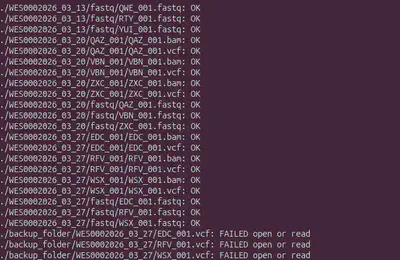
Then, perform a data integrity check, if everything is correct, each file will be marked as ‘OK’. If a file was corrupted during transfer or manually altered, md5sum will report it as ‘FAILED’."